 DJ Waveforms
The DJ performance surface for Ableton Live
DJ Waveforms turns a running Live set into DJ software: moving waveform decks, beat-exact transport, hot cues and loops, and a Library of your whole collection, in the set or not, that drops any track onto a deck warped and gridded, its key detected, matched and shifted. Stem songs as one deck, a mixer, full MIDI and keyboard control, any Live set. Live stays the audio engine.
The Ableton forum starts asking for Serato-style scrolling waveforms. The thread is still open.
The Bridge, the official Serato and Ableton answer, is discontinued. Free Max for Live experiments come and go.
DJ Waveforms ships. Built by a DJ who got tired of waiting.
Ableton Live is the most capable audio engine a DJ can own. It has just never behaved like DJ software.
DJ Waveforms makes it behave like one.
The engine stays
Your set, your warps, your racks, your routing and recording. The app adds no audio processing of its own: everything you hear is Live. DJ Waveforms is how you play it, not what makes the sound, so you could quit it mid-set and the music would keep playing.
In sync, at any tempo
Every warped clip follows the one project tempo, so decks cannot drift apart and the classic hard problems of DJ software simply do not exist. Tempo stops being a constraint, too: halve a track, double it, take it somewhere no turntable could, and hear it locked to the other decks as you go. Bold tempo moves become a creative tool instead of a risk.
Your set stays yours
The app never saves your project and never changes your clips, racks or audio files. It plays through its own copies and puts back whatever it moved. What it adds or changes in the set, it does because you asked, and it removes what is spent: a stem deck you make adds its stem tracks and routes them through the deck's track, and Plain deck undoes it. The .als on disk changes only when you save it in Live.
As much or as little as you need
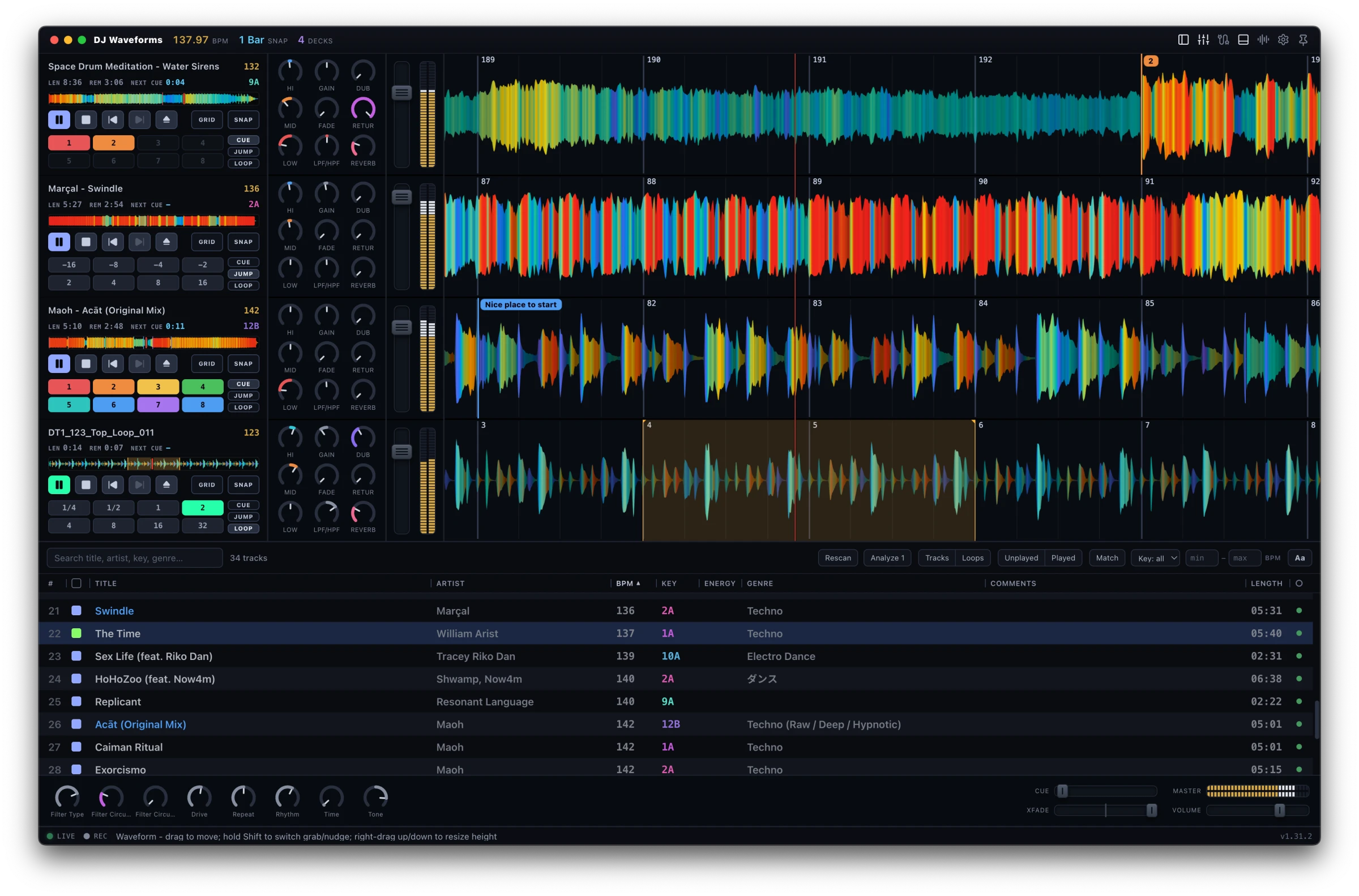
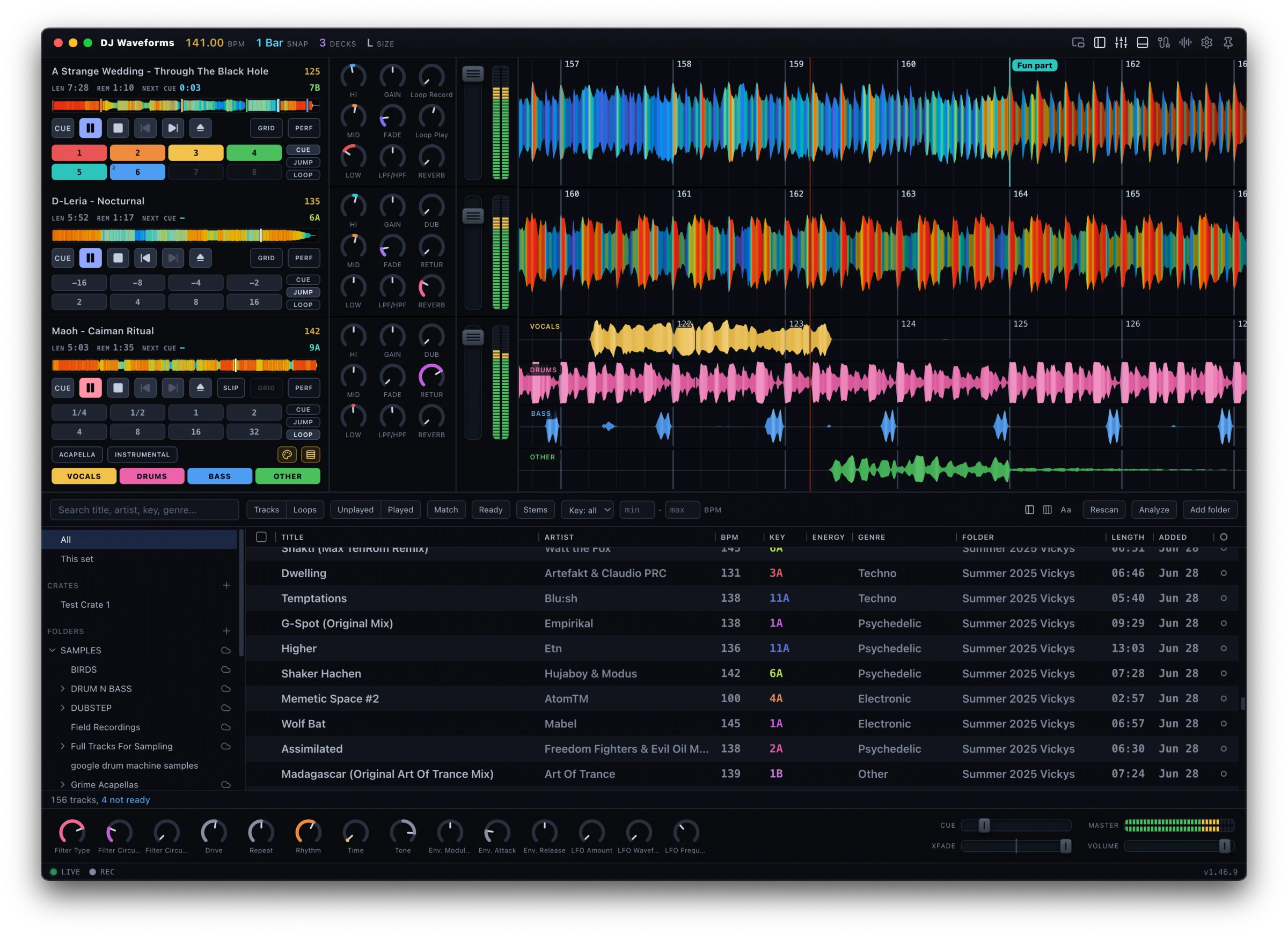
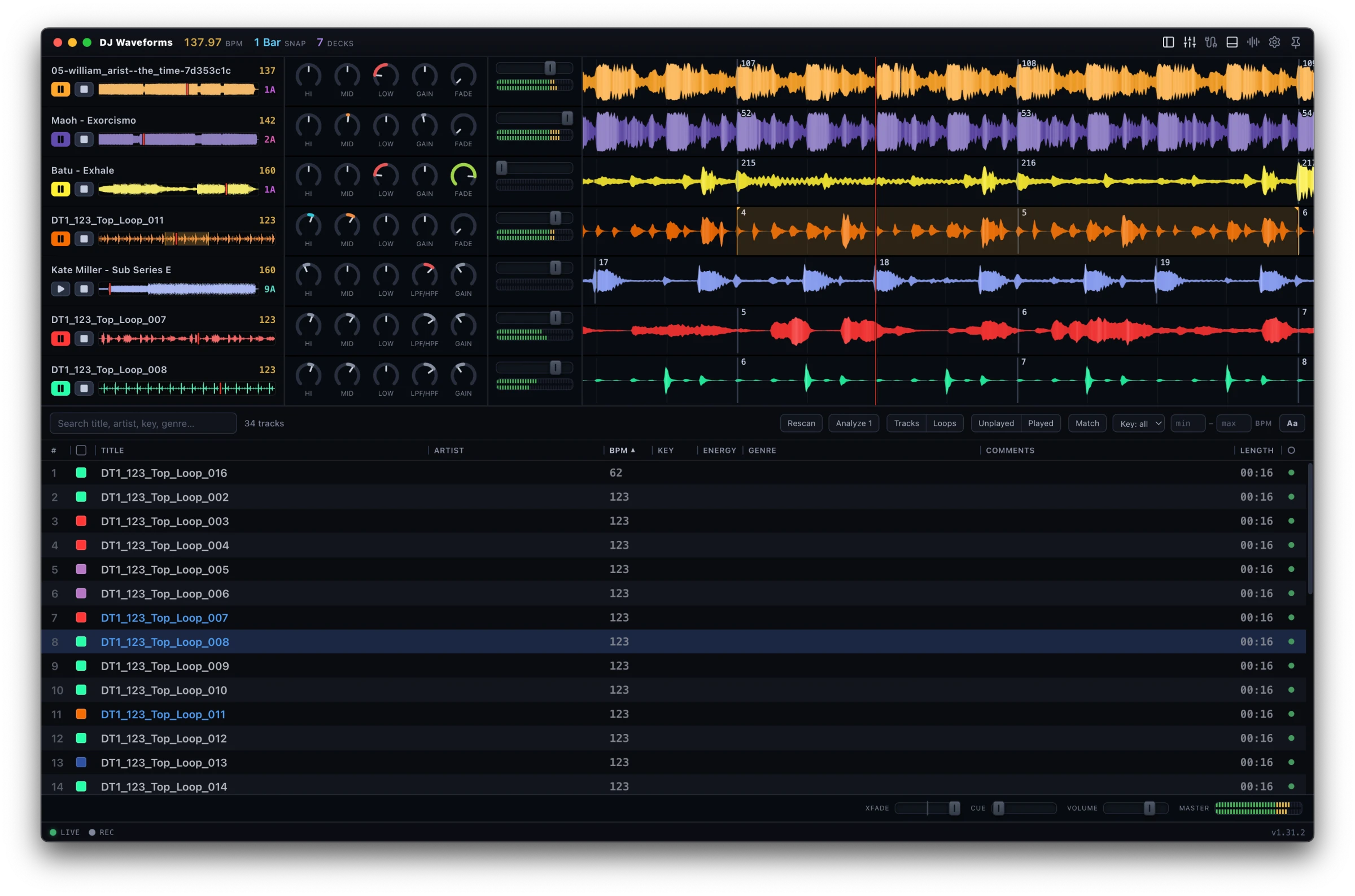
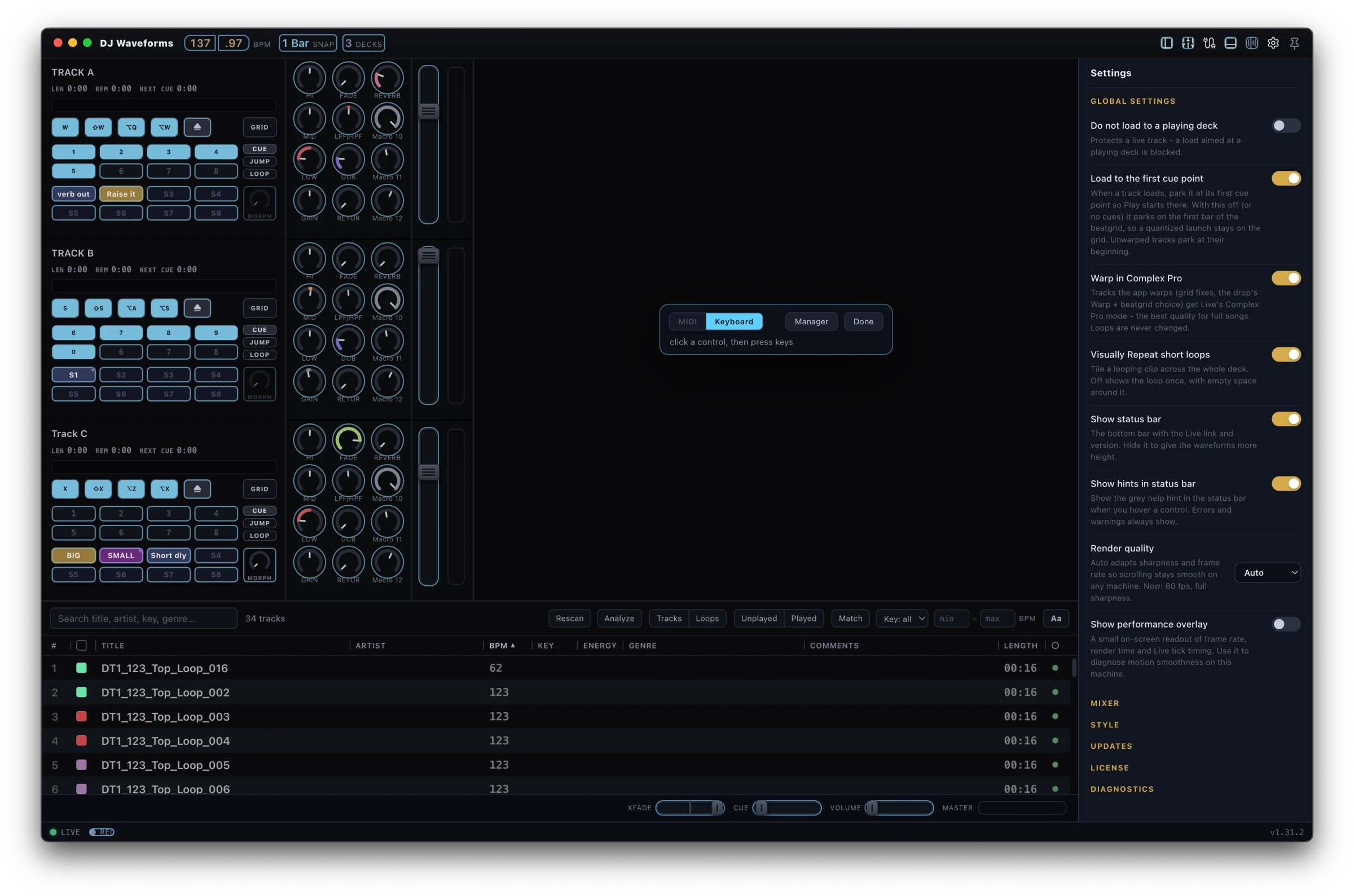
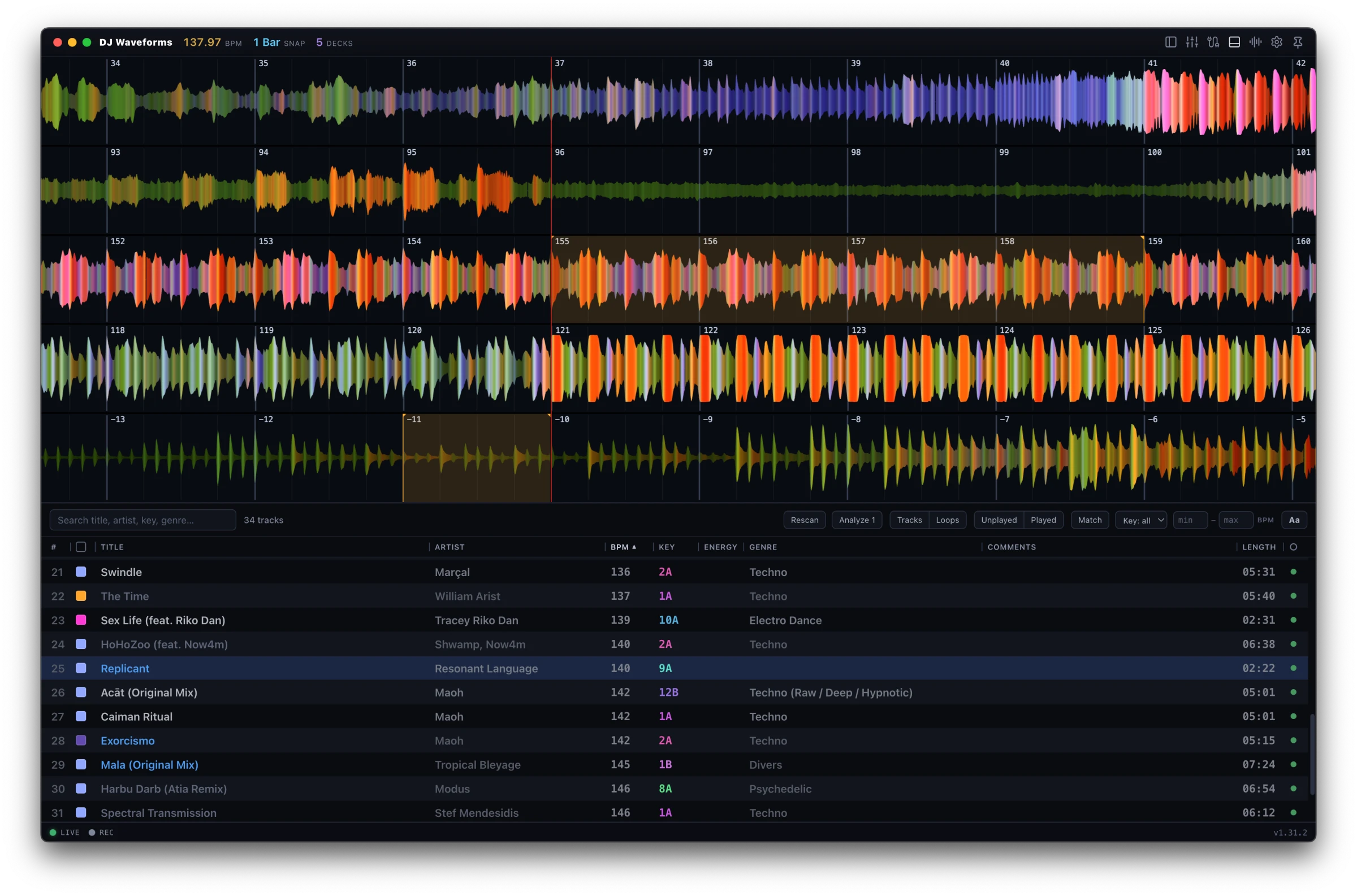
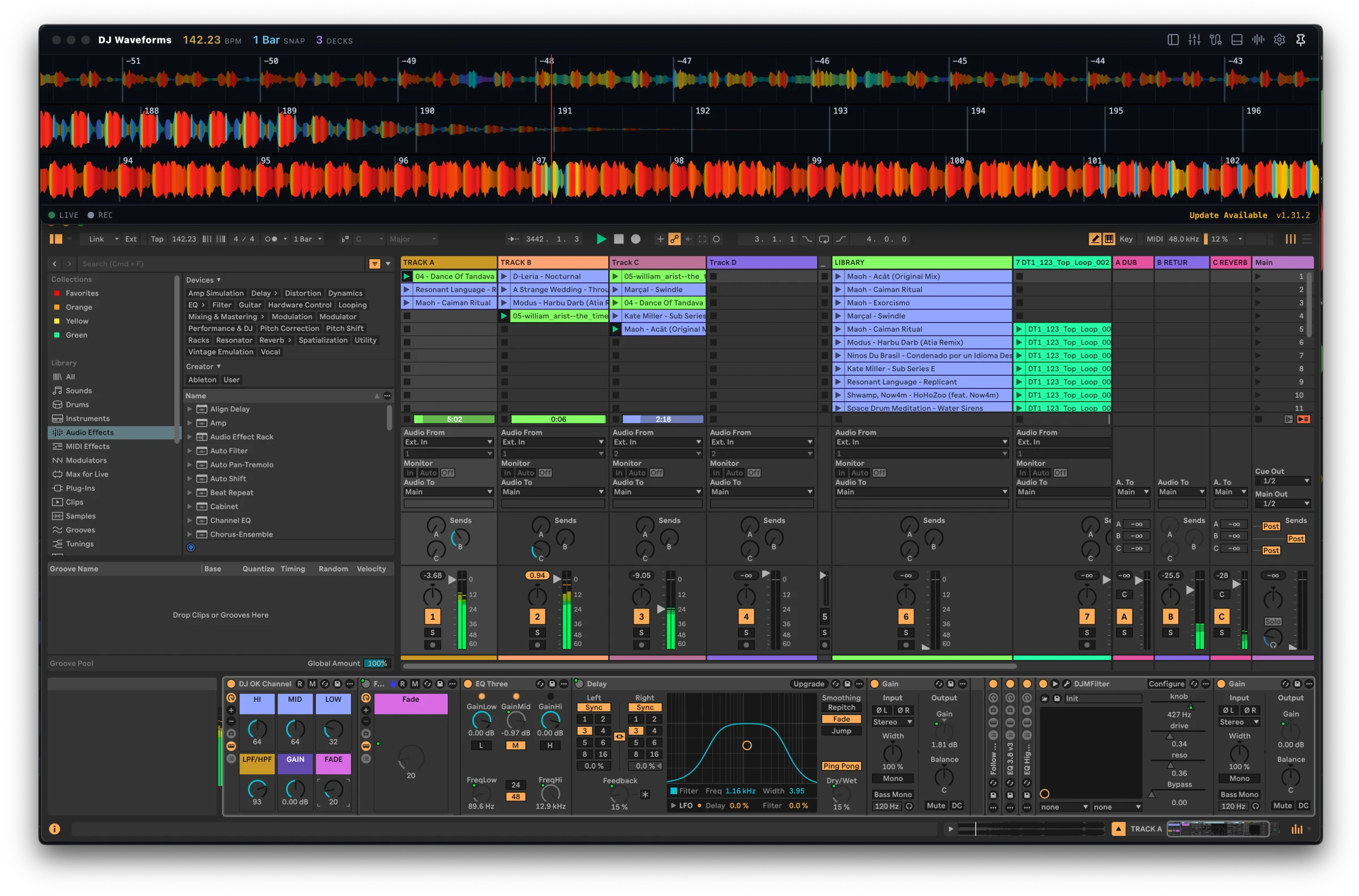
Up to sixteen decks side by side, four built-in waveform styles with an editor to design your own, and panels you show or hide at will - bring up the mixer and Library, or one icon strips the window down to the waveforms alone. Resize the decks, go compact, recolour the scroll; the surface settles into whatever the set in front of you asks for. Swipe, drag, or use the arrows.
Waveforms only view
One icon in the header and the window shrinks around the lanes: no deck controls, no mixer, no Library. Park it above Live and pin it on top; the mouse, the keyboard and MIDI all keep working.

More than waveforms
Cues, loops, keys, beatgrids, a Library that reaches your whole disk, crates, a mixer: the working surface of a DJ booth, driving Live directly. Every control maps to your hardware.
Hands on the waveform
Grab a wave and carry it; it lands back on the grid when you let go. Nudge a playing deck off the grid to match by ear, or fly across the whole track on the overview strip. Up to sixteen decks run side by side, each aligned to its clip's warp grid and coloured by what the music is doing. One header icon strips the window down to the lanes alone.
Hot cues that survive everything
Eight per track, with names, colours and section tints, keyed to an audio fingerprint rather than a file path, so they survive moves, renames and re-warps. Cues you set in Serato years ago are read from the file tags and arrive ready to play. A cue can carry a loop: one press jumps there and loops, and Loop when reached on the outro means the track never runs out. A cue can carry a warp mode too, Complex Pro for the vocal, Beats for the drums, switching exactly where the cue sits.
Loops, jumps and rolls
Grid-aligned loops from a quarter bar to 32, with halve and double on pads. Beat jumps move an active loop along with you, audio and all, landing on the bar. A momentary roll always lands back exactly where the track would have been.
A beatgrid editor, built in
When the grid is wrong, everything built on it goes wrong - so grids are fixable right on the deck, written as Live's own warp markers. Drag a kick under the playhead and tap 1.1.1 to set the downbeat; tap Align on a beat near the end and the exact BPM is derived from the audio between the two points, or type it in. On a playing deck the same drag becomes a turntable-style glide: beatmatch by ear, release, and the correction is written into the grid.
Prep the whole set in one pass
Analyze makes every track ready before the gig: Live's one-time analysis, the waveform cached, tempo, downbeat and key read from the audio and cross-checked against your tags and Live's own grid. The detection is precise enough to put the beat lines on the kicks, and to catch the grids Live guessed wrong. Confident fixes stack behind one Fix button; anything doubtful gets an amber dot and a plain reason on hover. A grid confirmed once is saved by the audio itself, so no track is ever gridded twice.
Change the key, keep the tempo
Drag a deck's key to shift it a semitone at a time, through Live's own Transpose on the deck's clip, so the tempo never moves. Click the key for key sync: the smallest shift that makes this deck compatible with the one playing, never more than two semitones, and the readout turns blue when it lands. Every deck reads in Camelot, tracks with no key tag get one detected from the audio, and Match in the Library uses the same six compatible keys.
Stems, one deck
Vocals, drums, bass and other play as one deck, in lock-step. A pad per stem mutes or solos it; Acapella and Instrumental are one press. Make any deck a stem deck from its menu and the stems play through that deck's own channel, rack and fader.
The mixer you already built
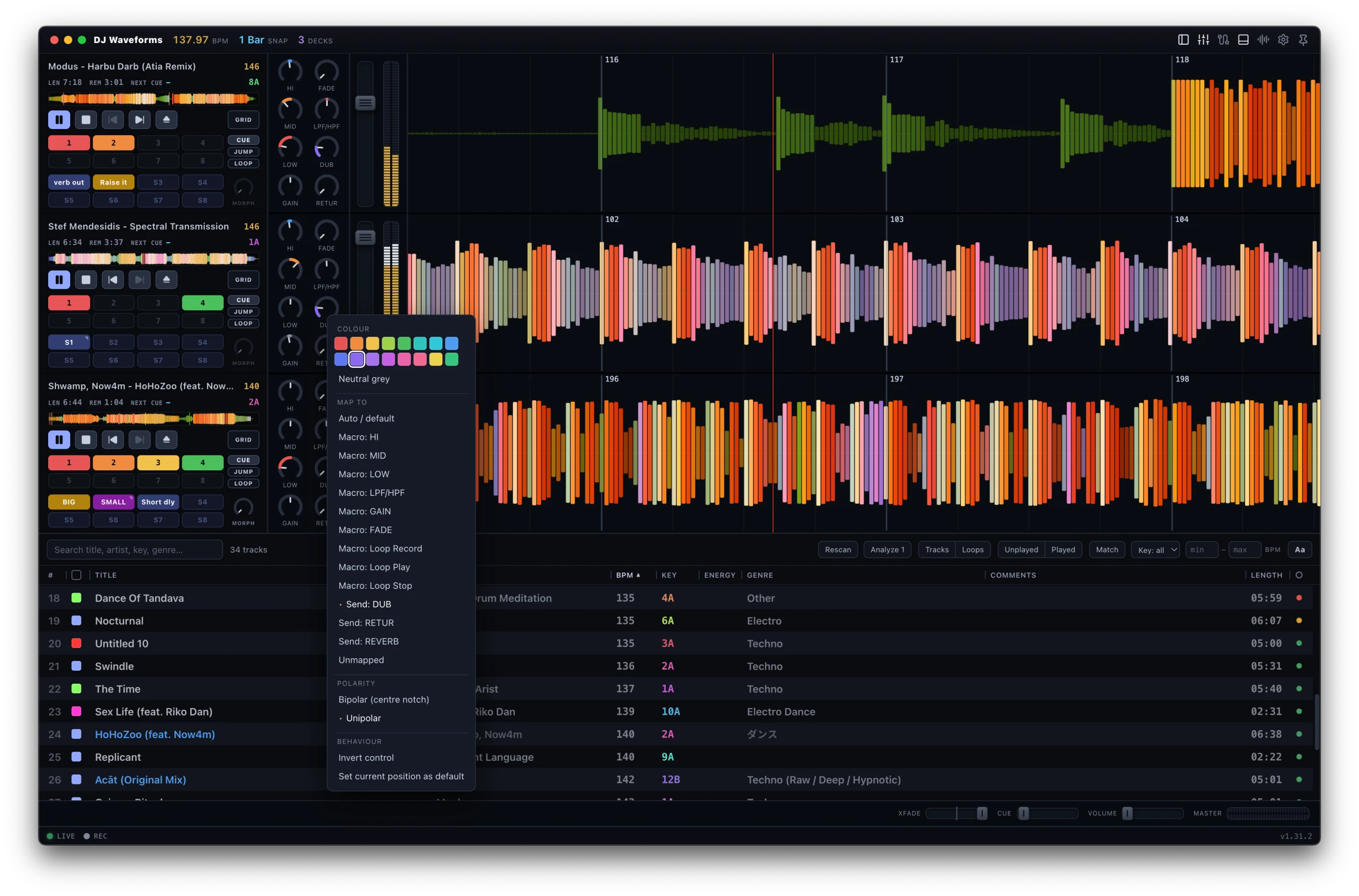
Faders that follow Live's own measured curve, stereo VU meters, and knobs that find your rack macros by themselves - every one of them remappable to any parameter of any device on the channel. It drives Live's mixer and adds no processing of its own.
One pad, every knob
A snapshot captures every knob on a deck - EQ, filter, sends, macros - into one pad. Fire it instantly, on the launch grid, or as a tempo-synced glide over 1 to 32 beats; hold pads spring back when released. The MORPH knob blends the deck toward a snapshot by hand, and touching any knob mid-move hands it back to you.
Map anything
One mapping mode for keys and MIDI alike: click a control, press a key or touch your hardware, done. Shift layers, soft takeover, per-control button modes, LED feedback, and a browse encoder that walks the Library, opens folders and loads. Serato-style keyboard shortcuts come mapped out of the box, and no controller is required at all.
Every track you own, one list
Your set's clips and whole folders on your disk, thousands of tracks, in one list: Camelot key, BPM, energy, genre, year, format, and a status dot that says whether a track is ready. Search across everything, filter by key, tempo range and played or unplayed, and press Match for the tracks that mix with what is playing. An unplugged drive stays listed and is found again the moment it is back; a file your cloud keeps online downloads from inside the app.
Drop it on a deck and it plays
Drag a row, or a file from Finder, Explorer or Live's own browser, onto any deck. A track that is not in the set is put there, warped and gridded on the way, and the lane says what it is doing. Nothing refuses a load, and nothing asks unless it would change your set. Drop onto a playing deck and the new track launches on the next bar: load and go. An ambient track you never want warped is marked once and plays as it is from then on.
Crates for the night
A crate is your own ordered list: drag rows onto it, drag inside it to set the order, and the # column keeps that order across sessions. Unplayed hides what you already played; Played shows the night in the order you played it, a set list that survives a crash or a reload. Add to set puts a crate's tracks into the set in crate order, so a gig can run with the Library closed.
Your library on every computer
Put the data folder on Dropbox and your cues, grids, crates and edits read the same on the studio machine and the gig laptop. Records travel with the audio, not the path, so a track that moves or gets renamed keeps everything. Every store is written crash-safe, a copy of each day is kept for a week, and one click backs the lot up to a zip.
Any Live set, any format
No template to install: your own set works as it is, and a deck can follow any audio track in it, so a set whose first channels are busy needs no rearranging. WAV, AIFF, FLAC, Ogg, MP3 and M4A all decode and draw through the same codec Live uses, so the waveform sits exactly on the sound. Auto gain levels every load to one loudness, on the app's own copy, never on your clip.
Playing in three steps
Install DJ Waveforms
Download, open, done. macOS builds are signed and notarized. No account to create.
Add the bridge to Live
One click in the app installs the AbletonJS Control Surface - the same standard mechanism every hardware controller uses. Enable it once in Live's Link/Tempo/MIDI preferences and restart Live.
Open your set and mix
The app connects by itself - no template to install, and your own template works as it is. Your audio tracks appear as decks, warped clips and all; right-click a deck to make it follow any audio track, so a set whose first channels are busy needs no rearranging. Add your music folders and the Library lists every track on your disk beside the set's clips; drop one on a deck and it plays. The mixer's knobs find your rack macros on their own. For a club-style strip, group Live's own EQ Three Rack with an Auto Filter and point two more knobs at your reverb and delay sends: six knobs, all stock. The manual has the recipe, and every gesture.
Try it as long as you like
Right now there are no limits at all. The app is a free open beta through October 15, 2026, with the trial pause switched off entirely - the full app, nothing timed, nothing withheld. From October 16 the trial is still the complete app: playback just pauses once after 15 minutes of continuous play, and the timer resets whenever your decks stop.The trial is the complete app - playback just pauses once after 15 minutes of continuous play, and the timer resets whenever your decks stop.
The full app, unlicensed and unlimited. Decide on your own schedule.
- No limits during the open beta - playback never pauses, nothing is switched off, through Oct 15, 2026
- Every feature included, MIDI too
- No account, no signup, no watermarks
- From Oct 16, 2026: playbackPlayback pauses briefly after 15 minutes of continuous play; the timer resets when all decks stop
The Windows build is unsigned at launch - SmartScreen will ask once: choose More info, then Run anyway.
Launch price through at least October 31, 2026 - then $79.One-time purchase. No subscription, ever.
- Perpetual license - pay once, keep it
- Free updates through 1.x
- Use on up to 3 computers - deactivate to move
- Activate once online, then works offline forever
- 14-day no-questions refund
Secure checkout by Lemon Squeezy, VAT handled, your key arrives by email within minutes and activates in Settings right away - during the beta too. License terms.
Student, broke, or between gigs? Email me - we will sort something out.
Asked and answered
+Is this a standalone DJ app?
No, and that is the point. DJ Waveforms needs Ableton Live running: it is the DJ head on Live's engine. Your tracks can be clips in the set or files in any folder on disk; Live keeps doing the audio: your warps, your racks, your routing, your recording.
+Do my tracks have to be in the Live set?
No. Add your music folders and the Library lists every track on your disk beside the set's clips, thousands of them, with the same keys, BPM, crates and status dots. Drop one on a deck and the app puts it in the set, warped and gridded, and plays it. Live 11.3.25 and 12.0.5 or newer load any file from any folder; older versions load files under a folder that is a Place in Live's browser.
+Does it modify my Live set or my audio files?
Never without you asking, and never your own clips, racks or audio files. A deck plays through a temporary copy of the clip on its own track, which the app removes once the deck has moved on; markers moved for beat-exact launches are restored on stop, swap and quit. Hot cues, grids and edits live in the app's own data folder, not in your tags, not in your set. What the app adds to the set, it adds because you asked, for example: the "DJ Waveforms Library" tracks that Add to set fills (one for tracks, muted ones numbered 1 and on for stem songs), the stem tracks of a deck you made a stem deck, routed into the deck's track (Plain deck removes them and restores the track), and warp markers written when you tell the beatgrid tools to fix a grid. Nothing reaches the .als until you save in Live.
+Which Live versions and editions work?
Ableton Live 11 and 12. The app connects through a standard MIDI Remote Script - the same mechanism every control surface uses.
+Will it work with my MIDI controller?
Any class-compliant MIDI device. There is an on-screen mapping mode (click a control, touch your hardware), per-control button modes, soft takeover, and state-driven LED feedback. No controller is required at all - keyboard shortcuts ship by default and the mouse drives everything.
+Do I need internet at a gig?
No. The license activates once online and is cached forever after. Dead venue wifi, a dropped connection, or the license server being down never locks you out and never interrupts a set.
+What exactly does the trial limit?
Right now, nothing at all. The app is a free open beta through October 15, 2026 and the trial pause is switched off entirely, so playback runs as long as you do. From October 16, one thing:One thing: after 15 minutes of continuous playback, playback pauses once - with a warning a minute before. Press play to carry on. Stop all decks and the timer resets. Every feature is included, MIDI and all styles too, for as long as you want to evaluate.
+Windows says it "protected my PC". Is that normal?
Yes. The Windows build is unsigned at launch (a code-signing certificate is planned), so SmartScreen asks once per version: click More info, then Run anyway. The macOS build is signed and notarized by Apple.
+Can it import my rekordbox or Serato library?
It does not import their databases. It reads your music folders straight from disk (alongside the clips in your set), and it reads your existing Serato hot cues and key tags straight from the files, so tracks you prepped elsewhere arrive with their cues in place - and tracks with no key tag get one detected from the audio.
+Refunds, and moving between machines?
14-day no-questions refunds. A license activates on up to 3 computers; deactivating one in Settings frees the slot. Ran out of slots after a few OS reinstalls? Email support and it gets fixed.
+Can I use it on two computers with the same library?
Yes. Point the data folder at Dropbox or any synced folder and your cues, grids, crates, played marks and edits read the same on each computer; the app takes turns, one computer at a time. Tracks are recorded by folder and relative path and by audio fingerprint, so a library that sits at a different path on each machine still lines up, and a track you move or rename keeps everything it had.
Mix everything you own, from Live.
Download the free betatrial, open your Live set, add your music folders, and play the way you always wanted to. If it clicks, it is $59 at launch$79, once.
MACOS + WINDOWS - ABLETON LIVE 11 + 12